SDL3 & OpenGL: Text Rendering with SDL3_ttf SDL3 и OpenGL: Рендеринг текста с помощью SDL3_ttf
A guide to rendering TrueType fonts into GPU memory using the SDL3 callback system, OpenGL 3.3, and cglm math utilities. Руководство по рендерингу шрифтов TrueType в память GPU с использованием системы обратных вызовов SDL3, OpenGL 3.3 и математической библиотеки cglm.
-
1. Obtain SDL3 and GLAD 1. Получение SDL3 и GLAD
Follow the guide to install and configure SDL3 and GLAD using CMake: Setting up SDL3 with find_package (MinGW). Следуйте руководству по установке и настройке SDL3 и GLAD с помощью CMake: Настройка SDL3 с помощью find_package (MinGW).
2. Obtain SDL3_ttf 3.2.2 2. Получение SDL3_ttf 3.2.2
-
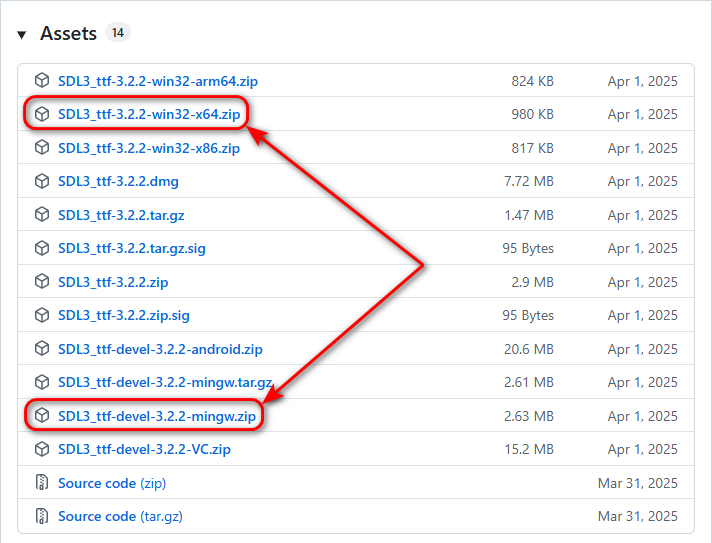
Download two archives from the official SDL_ttf release page:
Скачайте два архива со страницы официального релиза SDL_ttf:
-
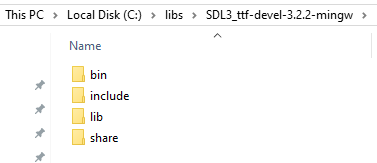
Extract the SDL3_ttf-devel-3.2.2-mingw.zip archive to the
C:/libs/SDL3_ttf-devel-3.2.2-mingwfolder. Распакуйте архив SDL3_ttf-devel-3.2.2-mingw.zip в папкуC:/libs/SDL3_ttf-devel-3.2.2-mingw. -
Move the headers and libraries so the structure is
SDL3_ttf-devel-3.2.2-mingw/include, etc: Переместите заголовочные файлы и библиотеки так, чтобы структура папок былаSDL3_ttf-devel-3.2.2-mingw/includeи т. д.:
-
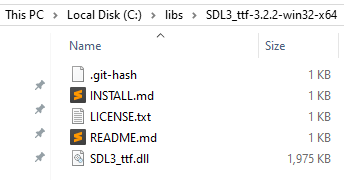
Extract the SDL3_ttf-3.2.2-win32-x64.zip archive so the path is exactly
C:/libs/SDL3_ttf-3.2.2-win32-x64: Распакуйте архив SDL3_ttf-3.2.2-win32-x64.zip так, чтобы путь был именноC:/libs/SDL3_ttf-3.2.2-win32-x64:
3. Add SDL3_ttf to Environment Variables (Path) 3. Добавление SDL3_ttf в переменные среды (Path)
To ensure your applications can find the SDL3_ttf.dll file at runtime, add the following path to the Path variable in your User variables section:
Чтобы приложения могли находить файл SDL3_ttf.dll при запуске, добавьте следующий путь в переменную Path в разделе Переменные среды пользователя:
C:\libs\SDL3_ttf-3.2.2-win32-x64
4. Obtain cglm 4. Получение cglm
-
Download the source cglm archive from the official cglm release page:
Скачайте архив с исходным кодом со страницы официального релиза cglm:

-
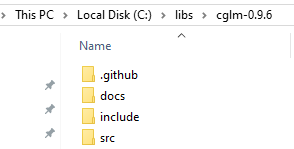
Extract the Source code (zip) archive to the
C:/libs/cglm-0.9.6folder: Распакуйте архив Source code (zip) в папкуC:/libs/cglm-0.9.6:
5. Project Structure and Assets 5. Структура проекта и ресурсы
Before creating the files, download the required asset: Перед созданием файлов скачайте необходимый ресурс:
- Download the TTF file: LiberationSans-Regular.zip Скачайте TTF-файл: LiberationSans-Regular.zip
- Note: This is a free file taken from this link. Примечание. Это бесплатный файл, который был взят по ссылке.
C Project: Create an empty folder named text-sdl3-ttf-opengl-mingw-c and set up the following hierarchy by creating new CMakeLists.txt and main.c files:
Проект на C: Создайте пустую папку с именем text-sdl3-ttf-opengl-mingw-c и подготовьте следующую иерархию, создав файлы CMakeLists.txt и main.c:
text-sdl3-ttf-opengl-mingw-c/
├── CMakeLists.txt
├── assets/fonts/
│   └── LiberationSans-Regular.ttf
└── src/
    └── main.c
C++ Project: Create an empty folder named text-sdl3-ttf-opengl-mingw-cpp and set up the following hierarchy by creating new CMakeLists.txt and main.cpp files:
Проект на C++: Создайте пустую папку с именем text-sdl3-ttf-opengl-mingw-cpp и подготовьте следующую иерархию, создав файлы CMakeLists.txt и main.cpp:
text-sdl3-ttf-opengl-mingw-cpp/
├── CMakeLists.txt
├── assets/fonts/
│   └── LiberationSans-Regular.ttf
└── src/
    └── main.cpp
6. CMake Configuration 6. Конфигурация CMake
C Project: Copy and paste the following code into the CMakeLists.txt file:
Проект на C: Скопируйте и вставьте следующее содержимое в файл CMakeLists.txt:
set(CMAKE_BUILD_TYPE "Debug")
cmake_minimum_required(VERSION 3.21)
project(text-sdl3-ttf-opengl-mingw-c)

set(SDL3_DIR "C:/libs/SDL3-devel-3.4.8-mingw/lib/cmake/SDL3")
set(SDL3_ttf_DIR "C:/libs/SDL3_ttf-devel-3.2.2-mingw/lib/cmake/SDL3_ttf")

find_package(SDL3 REQUIRED)
find_package(SDL3_ttf REQUIRED)

add_executable(app)

target_sources(app PRIVATE
    C:/libs/glad-0.1.36/opengl-3.3/src/glad.c
    src/main.c
)

target_include_directories(app PRIVATE C:/libs/cglm-0.9.6/include)
target_include_directories(app PRIVATE C:/libs/glad-0.1.36/opengl-3.3/include)

# Copy the assets folder to the dist folder
if(EXISTS "${CMAKE_SOURCE_DIR}/assets")
    add_custom_command(TARGET app POST_BUILD
        COMMAND ${CMAKE_COMMAND} -E copy_directory
                "${CMAKE_SOURCE_DIR}/assets"
                "$<TARGET_FILE_DIR:app>/assets"
        COMMENT "Copying assets directory"
    )
endif()

target_link_libraries(app PRIVATE SDL3_ttf::SDL3_ttf SDL3::SDL3)
target_link_options(app PRIVATE -mconsole)
C++ Project: Copy and paste the following code into the CMakeLists.txt file:
Проект на C++: Скопируйте и вставьте следующее содержимое в файл CMakeLists.txt:
set(CMAKE_BUILD_TYPE "Debug")
cmake_minimum_required(VERSION 3.21)
project(text-sdl3-ttf-opengl-mingw-cpp)

set(SDL3_DIR "C:/libs/SDL3-devel-3.4.8-mingw/lib/cmake/SDL3")
set(SDL3_ttf_DIR "C:/libs/SDL3_ttf-devel-3.2.2-mingw/lib/cmake/SDL3_ttf")

find_package(SDL3 REQUIRED)
find_package(SDL3_ttf REQUIRED)

add_executable(app)

target_sources(app PRIVATE
    C:/libs/glad-0.1.36/opengl-3.3/src/glad.c
    src/main.cpp
)

target_include_directories(app PRIVATE C:/libs/cglm-0.9.6/include)
target_include_directories(app PRIVATE C:/libs/glad-0.1.36/opengl-3.3/include)

# Copy the assets folder to the dist folder
if(EXISTS "${CMAKE_SOURCE_DIR}/assets")
    add_custom_command(TARGET app POST_BUILD
        COMMAND ${CMAKE_COMMAND} -E copy_directory
                "${CMAKE_SOURCE_DIR}/assets"
                "$<TARGET_FILE_DIR:app>/assets"
        COMMENT "Copying assets directory"
    )
endif()

target_link_libraries(app PRIVATE SDL3_ttf::SDL3_ttf SDL3::SDL3)
target_link_options(app PRIVATE -mconsole)
7. Source Code 7. Исходный код
Copy and paste the following code into the src/main.c (or src/main.cpp) file:
Скопируйте и вставьте следующее содержимое в файл src/main.c (или src/main.cpp):
#define SDL_MAIN_USE_CALLBACKS 1 // Use the callbacks instead of main()

#include <glad/glad.h>

#include <SDL3/SDL.h>
#include <SDL3/SDL_main.h>
#include <SDL3_ttf/SDL_ttf.h>
#include <cglm/cglm.h>

static SDL_Window *window = NULL;
static SDL_GLContext glContext;
static TTF_Font *font = NULL;
static GLuint textTexture = 0;
static int textW = 0, textH = 0;
static GLuint shaderProgram, vao, vbo;

static const size_t canvasWidth = 430;
static const size_t canvasHeight = 430;

static GLint projLoc;
static GLint modelLoc;

const char *vertexShaderSource =
    "#version 330 core\n"
    "layout (location = 0) in vec4 aVertex; // <vec2 pos, vec2 tex>\n"
    "out vec2 vTexCoord;\n"
    "uniform mat4 projection;\n"
    "uniform mat4 model;\n"
    "void main()\n"
    "{\n"
    "    gl_Position = projection * model * vec4(aVertex.xy, 0.0, 1.0);\n"
    "    vTexCoord = aVertex.zw;\n"
    "}\n";

const char *fragmentShaderSource =
    "#version 330 core\n"
    "precision mediump float;\n"
    "in vec2 vTexCoord;\n"
    "out vec4 fragColor;\n"
    "uniform sampler2D textSampler;\n"
    "void main()\n"
    "{\n"
    "    fragColor = texture(textSampler, vTexCoord);\n"
    "}\n";

static GLuint createTextureFromSurface(SDL_Surface *surface)
{
    GLuint texture;
    glGenTextures(1, &texture);
    glBindTexture(GL_TEXTURE_2D, texture);

    glPixelStorei(GL_UNPACK_ALIGNMENT, 1);

    glTexImage2D(GL_TEXTURE_2D, 0, GL_RGBA, surface->w, surface->h, 0, GL_RGBA, GL_UNSIGNED_BYTE, surface->pixels);
    glTexParameteri(GL_TEXTURE_2D, GL_TEXTURE_MIN_FILTER, GL_LINEAR);
    glTexParameteri(GL_TEXTURE_2D, GL_TEXTURE_MAG_FILTER, GL_LINEAR);
    return texture;
}

// This function runs once at startup
SDL_AppResult SDL_AppInit(void **appState, int argc, char *argv[])
{
    if (!SDL_Init(SDL_INIT_VIDEO))
    {
        SDL_Log("Couldn't initialize SDL: %s", SDL_GetError());
        return SDL_APP_FAILURE;
    }

    if (!TTF_Init())
    {
        SDL_Log("Couldn't initialize SDL_ttf: %s", SDL_GetError());
        return SDL_APP_FAILURE;
    }

    SDL_GL_SetAttribute(SDL_GL_MULTISAMPLEBUFFERS, 1); // Enable MULTISAMPLE
    SDL_GL_SetAttribute(SDL_GL_MULTISAMPLESAMPLES, 4); // can be 2, 4, 8 or 16

    SDL_GL_SetAttribute(SDL_GL_CONTEXT_PROFILE_MASK, SDL_GL_CONTEXT_PROFILE_CORE);
    SDL_GL_SetAttribute(SDL_GL_CONTEXT_MAJOR_VERSION, 3);
    SDL_GL_SetAttribute(SDL_GL_CONTEXT_MINOR_VERSION, 3);

    const char *title = "SDL3_ttf OpenGL";
    window = SDL_CreateWindow(title, canvasWidth, canvasHeight, SDL_WINDOW_OPENGL);
    if (!window)
    {
        SDL_Log("Couldn't create the window: %s", SDL_GetError());
        return SDL_APP_FAILURE;
    }

    glContext = SDL_GL_CreateContext(window);
    if (!glContext)
    {
        SDL_Log("Couldn't create the glContext: %s", SDL_GetError());
        return SDL_APP_FAILURE;
    }

    SDL_GL_SetSwapInterval(1); // Turn on vertical sync

    // Load standard Desktop GLAD mapping
    if (!gladLoadGLLoader((GLADloadproc)SDL_GL_GetProcAddress))
    {
        SDL_Log("Failed to initialize OpenGL function pointers");
        return SDL_APP_FAILURE;
    }

    glClearColor(0.2f, 0.2f, 0.2f, 1.0f);

    int w, h;
    SDL_GetWindowSize(window, &w, &h);
    glViewport(0, 0, w, h);

    glEnable(GL_BLEND);
    glBlendFunc(GL_SRC_ALPHA, GL_ONE_MINUS_SRC_ALPHA);

    // Shader Setup
    GLuint vs = glCreateShader(GL_VERTEX_SHADER);
    glShaderSource(vs, 1, &vertexShaderSource, NULL);
    glCompileShader(vs);
    GLuint fs = glCreateShader(GL_FRAGMENT_SHADER);
    glShaderSource(fs, 1, &fragmentShaderSource, NULL);
    glCompileShader(fs);
    shaderProgram = glCreateProgram();
    glAttachShader(shaderProgram, vs);
    glAttachShader(shaderProgram, fs);
    glLinkProgram(shaderProgram);
    glUseProgram(shaderProgram);

    // GLint success;
    // glGetShaderiv(vs, GL_COMPILE_STATUS, &success);
    // if (!success)
    // {
    //     char infoLog[512];
    //     glGetShaderInfoLog(vs, 512, NULL, infoLog);
    //     SDL_Log("Shader Error: %s", infoLog);
    // }

    // Load Font
    font = TTF_OpenFont("assets/fonts/LiberationSans-Regular.ttf", 36.0f);
    if (!font)
    {
        SDL_Log("Font error: %s", SDL_GetError());
        return SDL_APP_FAILURE;
    }

    // Render text to surface, then to GL texture
    SDL_Color color = { 170, 255, 195, 255 };
    SDL_Surface *s = TTF_RenderText_Blended_Wrapped(font, "Hello, OpenGL!\n\nПривет, OpenGL!", 0, color, 0);
    if (s)
    {
        // Convert surface to a guaranteed RGBA format
        SDL_Surface *converted = SDL_ConvertSurface(s, SDL_PIXELFORMAT_RGBA32);
        SDL_DestroySurface(s); // Free the original

        if (converted)
        {
            textW = converted->w;
            textH = converted->h;
            textTexture = createTextureFromSurface(converted);
            SDL_DestroySurface(converted);
        }
    }

    // VAO/VBO Setup (Unit Quad 0.0 to 1.0)
    float verts[] = {
        // x, y, u, v
        0.0f, 1.0f, 0.0f, 1.0f,
        1.0f, 0.0f, 1.0f, 0.0f,
        0.0f, 0.0f, 0.0f, 0.0f,

        0.0f, 1.0f, 0.0f, 1.0f,
        1.0f, 1.0f, 1.0f, 1.0f,
        1.0f, 0.0f, 1.0f, 0.0f
    };
    glGenVertexArrays(1, &vao);
    glGenBuffers(1, &vbo);
    glBindVertexArray(vao);
    glBindBuffer(GL_ARRAY_BUFFER, vbo);
    glBufferData(GL_ARRAY_BUFFER, sizeof(verts), verts, GL_STATIC_DRAW);
    glVertexAttribPointer(0, 4, GL_FLOAT, GL_FALSE, 4 * sizeof(float), (void *)0);
    glEnableVertexAttribArray(0);

    projLoc = glGetUniformLocation(shaderProgram, "projection");
    modelLoc = glGetUniformLocation(shaderProgram, "model");

    return SDL_APP_CONTINUE;
}

// This function runs when a new event (mouse input, keypresses, etc) occurs
SDL_AppResult SDL_AppEvent(void *appState, SDL_Event *event)
{
    switch (event->type)
    {
        case SDL_EVENT_QUIT:
        {
            return SDL_APP_SUCCESS;
            break;
        }
        default:
            break;
    }
    return SDL_APP_CONTINUE;
}

// This function runs once per frame, and is the heart of the program
SDL_AppResult SDL_AppIterate(void *appState)
{
    glClear(GL_COLOR_BUFFER_BIT);

    // Projection Matrix
    mat4 proj;
    glm_ortho(0.0f, (float)canvasWidth, (float)canvasHeight, 0.0f, -1.0f, 1.0f, proj);

    // Model matrix
    mat4 model;
    glm_mat4_identity(model);
    vec3 pos = { 20.0f, 100.f, 0.0f };
    glm_translate(model, pos); // Setting position with cglm
    vec3 scale = { (float)textW, (float)textH, 1.0f };
    glm_scale(model, scale); // Setting size with cglm

    glUniformMatrix4fv(projLoc, 1, GL_FALSE, (float *)proj);
    glUniformMatrix4fv(modelLoc, 1, GL_FALSE, (float *)model);

    glBindTexture(GL_TEXTURE_2D, textTexture);
    glBindVertexArray(vao);
    glDrawArrays(GL_TRIANGLES, 0, 6);

    SDL_GL_SwapWindow(window);
    return SDL_APP_CONTINUE;
}

// This function runs once at shutdown
void SDL_AppQuit(void *appState, SDL_AppResult result)
{
    glDeleteTextures(1, &textTexture);
    TTF_CloseFont(font);
    TTF_Quit();
    SDL_GL_DestroyContext(glContext);
    SDL_DestroyWindow(window);
}
8. Opening the Project in IDEs 8. Открытие проекта в IDE
Open the CMakeLists.txt file in CLion or Qt Creator. CMake will handle the configuration. Откройте файл CMakeLists.txt в CLion или Qt Creator. CMake позаботится об остальном конфигурационном процессе.
9. Automation Scripts (.bat) 9. Скрипты автоматизации (.bat)
You can open the project folder in Sublime Text 4. Create the following .bat scripts in the project root directory to automate building and running:
Вы можете открыть папку проекта в Sublime Text 4. Создайте следующие .bat скрипты в корневой директории проекта для автоматизации сборки и запуска:
1. config-exe.bat
cmake -G "MinGW Makefiles" -S . -B dist/exe2. build-exe.bat
cd dist\exe
cmake --build .
cd ..\..
3. run-exe.bat
dist\exe\appconfig-exe
build-exe
run-exe10. Source Code & Downloads 10. Исходный код и загрузки
You can download the complete configured project as a ZIP archive or explore the source code directly on GitHub: Вы можете скачать готовую настроенную сборку проекта в виде ZIP-архива или изучить исходный код прямо на GitHub:
Support My Work Поддержать проект
If these tutorials helped you, consider buying me a coffee! Если эти туториалы вам помогли, вы можете поддержать автора.
Sberbank (Russia only) Сбербанк (только для РФ)

Direct transfer via phone number (Russia only) Перевод по номеру телефона (только для РФ)
USDT TRC20

Support via Cryptocurrency Поддержка криптовалютой