Setting up SDL3 with OpenGL and GLAD (MinGW) Настройка SDL3 с OpenGL и GLAD (MinGW)
Building and running an SDL3 application with OpenGL and GLAD in C or C++ on Windows using MinGW 13.1 and CMake. Сборка и запуск приложения SDL3 с использованием OpenGL и GLAD на C или C++ на Windows с помощью MinGW 13.1 и CMake.
1. Obtain SDL 3.4.8 1. Получение SDL 3.4.8
-
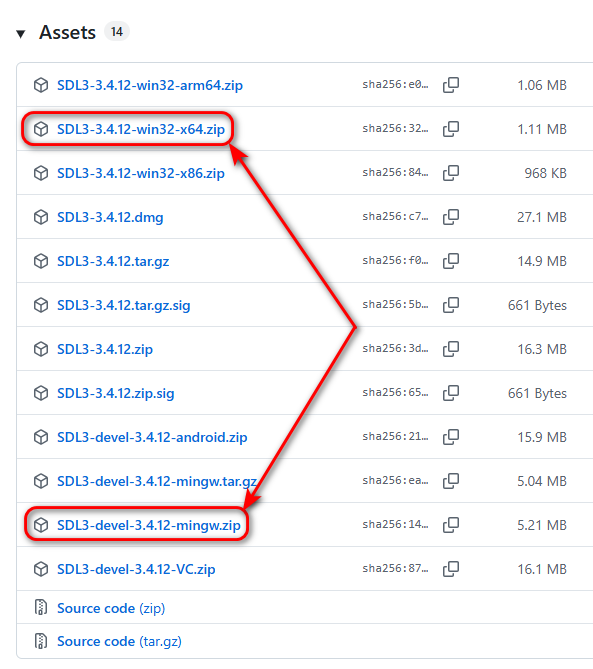
Download two archives from the official release page:
Скачайте два архива со страницы официального релиза:
-
Extract the SDL3-devel-3.4.8-mingw.zip archive to the
C:/libs/SDL3-devel-3.4.8-mingwfolder. Распакуйте архив SDL3-devel-3.4.8-mingw.zip в папкуC:/libs/SDL3-devel-3.4.8-mingw. -
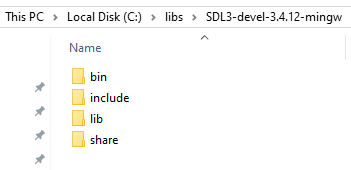
Move the headers and libraries so the structure is
SDL3-devel-3.4.8-mingw/include, etc: Переместите заголовочные файлы и библиотеки так, чтобы структура папок былаSDL3-devel-3.4.8-mingw/includeи т. д.:
-
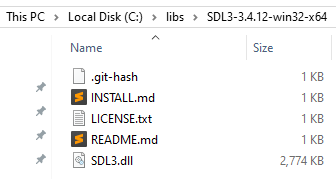
Extract the SDL3-3.4.8-win32-x64.zip archive so the path is exactly
C:/libs/SDL3-3.4.8-win32-x64: Распакуйте архив SDL3-3.4.8-win32-x64.zip так, чтобы путь был именноC:/libs/SDL3-3.4.8-win32-x64:
2. Add SDL3 to Environment Variables (Path) 2. Добавление SDL3 в переменные среды (Path)
To ensure your applications can find the SDL3.dll file at runtime, you should add the following path to the Path variable in your User variables section:
Чтобы приложения могли находить SDL3.dll файл при запуске, добавьте следующий путь в переменную Path в разделе Переменные среды пользователя:
C:\libs\SDL3-3.4.8-win32-x64
3. Obtain GLAD 3. Получение GLAD
-
Go to the GLAD Web Generator and use the following settings:
Перейдите в веб-генератор GLAD и используйте следующие настройки:
- Language: C/C++
- Specification: OpenGL
- API gl: Version 3.3
- Profile: Core
- Options: Generate a loader
-
Click Generate, download the
glad.ziparchive, and extract it toC:/libs/glad-0.1.36/opengl-3.3(you can find the GLAD version at the bottom of the generator page). Нажмите Generate, скачайте архивglad.zipи распакуйте его вC:/libs/glad-0.1.36/opengl-3.3(версию GLAD можно найти в нижней части страницы генератора). -
Ensure the following path structure:
Убедитесь в следующей структуре пути:
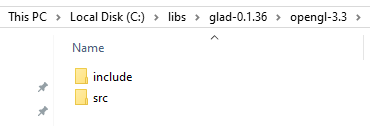
C:/libs/glad-0.1.36/opengl-3.3/ ├── include/ │ ├── glad/glad.h │ └── KHR/khrplatform.h └── src/ └── glad.c
3. Project Structure 3. Структура проекта
C Project: Create an empty folder named triangle-sdl3-opengl-c and set up the following hierarchy by creating new CMakeLists.txt and src/main.c files:
Проект на C: Создайте пустую папку с именем triangle-sdl3-opengl-c и подготовьте следующую иерархию, создав файлы CMakeLists.txt и src/main.c:
triangle-sdl3-opengl-c/
├── CMakeLists.txt
└── src/
└── main.c
C++ Project: Create an empty folder named triangle-sdl3-opengl-cpp and set up the following hierarchy by creating new CMakeLists.txt and src/main.cpp files:
Проект на C++: Создайте пустую папку с именем triangle-sdl3-opengl-cpp и подготовьте следующую иерархию, создав файлы CMakeLists.txt и src/main.cpp:
triangle-sdl3-opengl-cpp/
├── CMakeLists.txt
└── src/
└── main.cpp
4. Project Configuration (CMakeLists.txt) 4. Конфигурация проекта (CMakeLists.txt)
C Project: Copy and paste the following code into the CMakeLists.txt file:
Проект на C: Скопируйте и вставьте следующее содержимое в файл CMakeLists.txt:
CMakeLists.txt (C version)
set(CMAKE_BUILD_TYPE "Debug")
cmake_minimum_required(VERSION 3.21)
project(triangle-sdl3-opengl-c)
set(SDL3_DIR "C:/libs/SDL3-devel-3.4.8-mingw/lib/cmake/SDL3")
find_package(SDL3 REQUIRED)
add_executable(app)
target_include_directories(app PRIVATE "C:/libs/glad-0.1.36/opengl-3.3/include")
target_sources(app
PRIVATE
"C:/libs/glad-0.1.36/opengl-3.3/src/glad.c"
src/main.c
)
target_link_libraries(app PRIVATE SDL3::SDL3)
target_link_options(app PRIVATE -mconsole)
C++ Project: Copy and paste the following code into the CMakeLists.txt file:
Проект на C++: Скопируйте и вставьте следующее содержимое в файл CMakeLists.txt:
CMakeLists.txt (C++ version)
set(CMAKE_BUILD_TYPE "Debug")
cmake_minimum_required(VERSION 3.21)
project(triangle-sdl3-opengl-cpp)
set(SDL3_DIR "C:/libs/SDL3-devel-3.4.8-mingw/lib/cmake/SDL3")
find_package(SDL3 REQUIRED)
add_executable(app)
target_include_directories(app PRIVATE "C:/libs/glad-0.1.36/opengl-3.3/include")
target_sources(app
PRIVATE
"C:/libs/glad-0.1.36/opengl-3.3/src/glad.c"
src/main.cpp
)
target_link_libraries(app PRIVATE SDL3::SDL3)
target_link_options(app PRIVATE -mconsole)
5. Source Code 5. Исходный код
Copy and paste the following code into the src/main.c (or src/main.cpp) file:
Скопируйте и вставьте следующее содержимое в файл src/main.c (или src/main.cpp):
main.c / main.cpp
#include <glad/glad.h>
#include <SDL3/SDL.h>
#include <SDL3/SDL_main.h>
const char *vertexShaderSource =
"#version 330 core\n"
"layout (location = 0) in vec3 aPosition;\n"
"void main()\n"
"{\n"
" gl_Position = vec4(aPosition, 1.0);\n"
"}\n";
const char *fragmentShaderSource =
"#version 330 core\n"
"precision mediump float;\n"
"out vec4 fragColor;\n"
"void main()\n"
"{\n"
" fragColor = vec4(0.0f, 1.0f, 0.0f, 1.0f);\n"
"}\n";
int main(int argc, char *argv[])
{
if (!SDL_Init(SDL_INIT_VIDEO))
return -1;
SDL_GL_SetAttribute(SDL_GL_CONTEXT_PROFILE_MASK, SDL_GL_CONTEXT_PROFILE_CORE);
SDL_GL_SetAttribute(SDL_GL_CONTEXT_MAJOR_VERSION, 3);
SDL_GL_SetAttribute(SDL_GL_CONTEXT_MINOR_VERSION, 3);
SDL_Window *window = SDL_CreateWindow("SDL3 OpenGL Triangle", 380, 380, SDL_WINDOW_OPENGL);
SDL_GLContext glContext = SDL_GL_CreateContext(window);
if (!gladLoadGLLoader((GLADloadproc)SDL_GL_GetProcAddress))
return -1;
SDL_GL_SetSwapInterval(1); // Turn on vertical sync
// Simple Shader Compilation
unsigned int vertexShader = glCreateShader(GL_VERTEX_SHADER);
glShaderSource(vertexShader, 1, &vertexShaderSource, NULL);
glCompileShader(vertexShader);
unsigned int fragmentShader = glCreateShader(GL_FRAGMENT_SHADER);
glShaderSource(fragmentShader, 1, &fragmentShaderSource, NULL);
glCompileShader(fragmentShader);
unsigned int shaderProgram = glCreateProgram();
glAttachShader(shaderProgram, vertexShader);
glAttachShader(shaderProgram, fragmentShader);
glLinkProgram(shaderProgram);
glDeleteShader(vertexShader);
glDeleteShader(fragmentShader);
float vertices[] = {
-0.5f, -0.5f, 0.0f,
0.5f, -0.5f, 0.0f,
0.0f, 0.5f, 0.0f
};
unsigned int VBO, VAO;
glGenVertexArrays(1, &VAO);
glGenBuffers(1, &VBO);
glBindVertexArray(VAO);
glBindBuffer(GL_ARRAY_BUFFER, VBO);
glBufferData(GL_ARRAY_BUFFER, sizeof(vertices), vertices, GL_STATIC_DRAW);
glVertexAttribPointer(0, 3, GL_FLOAT, GL_FALSE, 3 * sizeof(float), (void *)0);
glEnableVertexAttribArray(0);
bool running = true;
SDL_Event event;
while (running)
{
while (SDL_PollEvent(&event))
{
if (event.type == SDL_EVENT_QUIT)
running = false;
}
glClearColor(0.1f, 0.1f, 0.1f, 1.0f);
glClear(GL_COLOR_BUFFER_BIT);
glUseProgram(shaderProgram);
glBindVertexArray(VAO);
glDrawArrays(GL_TRIANGLES, 0, 3);
SDL_GL_SwapWindow(window);
}
glDeleteVertexArrays(1, &VAO);
glDeleteBuffers(1, &VBO);
glDeleteProgram(shaderProgram);
SDL_GL_DestroyContext(glContext);
SDL_DestroyWindow(window);
SDL_Quit();
return 0;
}
6. Opening the Project in IDEs 6. Открытие проекта в IDE
Open the CMakeLists.txt file in CLion or Qt Creator. CMake will handle the rest. Откройте файл CMakeLists.txt в CLion или Qt Creator. CMake позаботится об остальном.
7. Automation Scripts (.bat) 7. Скрипты автоматизации (.bat)
You can open the project folder in Sublime Text 4 (or Notepad++). Create the following .bat scripts in the project root directory to automate the configuration, building, and running of your application:
Вы можете открыть папку проекта в Sublime Text 4 (или Notepad++). Создайте следующие .bat скрипты в корневой директории проекта для автоматизации конфигурации, сборки и запуска вашего приложения:
1. config-exe.bat
cmake -G "MinGW Makefiles" -S . -B dist/exe
2. build-exe.bat
cd dist\exe
cmake --build .
cd ..\..
3. run-exe.bat
dist\exe\app
8. Alternative: SDL3 Callback System 8. Альтернатива: Система Callbacks в SDL3
SDL3 introduces a modern callback-based approach. Instead of a while loop, you define specific functions that SDL calls when needed. This is the preferred method for Web (Emscripten) and Mobile platforms.
В SDL3 представлен современный подход на основе обратных вызовов (callbacks). Вместо цикла while вы определяете специальные функции, которые SDL вызывает по мере необходимости. Это рекомендуемый метод для Web (Emscripten) и мобильных платформ.
| Function | Description Описание |
|---|---|
SDL_AppInit |
Called once at startup. Initialize SDL, create window, and load assets here. Вызывается один раз при запуске. Инициализация SDL, окна и загрузка ресурсов. |
SDL_AppEvent |
Called whenever a new event (keyboard, mouse, quit) occurs. Вызывается каждый раз, когда происходит событие (клавиатура, мышь, выход). |
SDL_AppIterate |
The "Heartbeat". Called every frame. Put your rendering and logic here. "Сердцебиение" программы. Вызывается каждый кадр. Здесь происходит рендеринг. |
SDL_AppQuit |
Called before exiting. Clean up and free memory here. Вызывается перед выходом. Очистка и освобождение памяти. |
main.c / main.cpp (Callback Version)
#define SDL_MAIN_USE_CALLBACKS 1
#include <glad/glad.h>
#include <SDL3/SDL.h>
#include <SDL3/SDL_main.h>
const char *vertexShaderSource =
"#version 330 core\n"
"layout (location = 0) in vec3 aPosition;\n"
"void main()\n"
"{\n"
" gl_Position = vec4(aPosition, 1.0);\n"
"}\n";
const char *fragmentShaderSource =
"#version 330 core\n"
"precision mediump float;\n"
"out vec4 fragColor;\n"
"void main()\n"
"{\n"
" fragColor = vec4(0.0f, 1.0f, 0.0f, 1.0f);\n"
"}\n";
// Global application state to persist data between callbacks
struct AppState {
SDL_Window *window;
SDL_GLContext glContext;
unsigned int shaderProgram;
unsigned int VAO, VBO;
} state;
// Initialization callback
SDL_AppResult SDL_AppInit(void **appstate, int argc, char *argv[])
{
if (!SDL_Init(SDL_INIT_VIDEO))
return SDL_APP_FAILURE;
SDL_GL_SetAttribute(SDL_GL_CONTEXT_PROFILE_MASK, SDL_GL_CONTEXT_PROFILE_CORE);
SDL_GL_SetAttribute(SDL_GL_CONTEXT_MAJOR_VERSION, 3);
SDL_GL_SetAttribute(SDL_GL_CONTEXT_MINOR_VERSION, 3);
state.window = SDL_CreateWindow("SDL3 OpenGL Triangle", 380, 380, SDL_WINDOW_OPENGL);
if (!state.window)
return SDL_APP_FAILURE;
state.glContext = SDL_GL_CreateContext(state.window);
if (!state.glContext)
return SDL_APP_FAILURE;
if (!gladLoadGLLoader((GLADloadproc)SDL_GL_GetProcAddress))
return SDL_APP_FAILURE;
SDL_GL_SetSwapInterval(1); // Turn on vertical sync
// Simple Shader Compilation
unsigned int vertexShader = glCreateShader(GL_VERTEX_SHADER);
glShaderSource(vertexShader, 1, &vertexShaderSource, NULL);
glCompileShader(vertexShader);
unsigned int fragmentShader = glCreateShader(GL_FRAGMENT_SHADER);
glShaderSource(fragmentShader, 1, &fragmentShaderSource, NULL);
glCompileShader(fragmentShader);
state.shaderProgram = glCreateProgram();
glAttachShader(state.shaderProgram, vertexShader);
glAttachShader(state.shaderProgram, fragmentShader);
glLinkProgram(state.shaderProgram);
glDeleteShader(vertexShader);
glDeleteShader(fragmentShader);
float vertices[] = {
-0.5f, -0.5f, 0.0f,
0.5f, -0.5f, 0.0f,
0.0f, 0.5f, 0.0f
};
glGenVertexArrays(1, &state.VAO);
glGenBuffers(1, &state.VBO);
glBindVertexArray(state.VAO);
glBindBuffer(GL_ARRAY_BUFFER, state.VBO);
glBufferData(GL_ARRAY_BUFFER, sizeof(vertices), vertices, GL_STATIC_DRAW);
glVertexAttribPointer(0, 3, GL_FLOAT, GL_FALSE, 3 * sizeof(float), (void *)0);
glEnableVertexAttribArray(0);
return SDL_APP_CONTINUE;
}
// Event handling callback (called automatically per event by SDL3)
SDL_AppResult SDL_AppEvent(void *appstate, SDL_Event *event)
{
if (event->type == SDL_EVENT_QUIT) {
return SDL_APP_SUCCESS; // Stops the application cleanly
}
return SDL_APP_CONTINUE;
}
// Main loop iteration callback (called repeatedly)
SDL_AppResult SDL_AppIterate(void *appstate)
{
glClearColor(0.1f, 0.1f, 0.1f, 1.0f);
glClear(GL_COLOR_BUFFER_BIT);
glUseProgram(state.shaderProgram);
glBindVertexArray(state.VAO);
glDrawArrays(GL_TRIANGLES, 0, 3);
SDL_GL_SwapWindow(state.window);
return SDL_APP_CONTINUE;
}
// Cleanup callback (called automatically when application exits)
void SDL_AppQuit(void *appstate, SDL_AppResult result)
{
glDeleteVertexArrays(1, &state.VAO);
glDeleteBuffers(1, &state.VBO);
glDeleteProgram(state.shaderProgram);
SDL_GL_DestroyContext(state.glContext);
SDL_DestroyWindow(state.window);
SDL_Quit();
}
9. Source Code & Downloads 9. Исходный код и загрузки
You can download the complete configured project as a ZIP archive or explore the source code directly on GitHub: Вы можете скачать готовую настроенную сборку проекта в виде ZIP-архива или изучить исходный код прямо на GitHub:
Support My Work Поддержать проект
If these tutorials helped you, consider buying me a coffee! Если эти туториалы вам помогли, вы можете поддержать автора.
Sberbank
Direct transfer via phone number Перевод по номеру телефона
Bybit (USDT TRC20)
Support via Cryptocurrency Поддержка криптовалютой