SDL3 Desktop: Setup for C and C++ (MinGW 13.1) SDL3 для Desktop: Настройка для C и C++ (MinGW 13.1)
A guide to configuring SDL3 with CMake and MinGW on Windows for both C and C++. Руководство по настройке SDL3 с использованием CMake и MinGW на Windows для C и C++.
1. Obtain SDL 3.4.8 1. Получение SDL 3.4.8
-
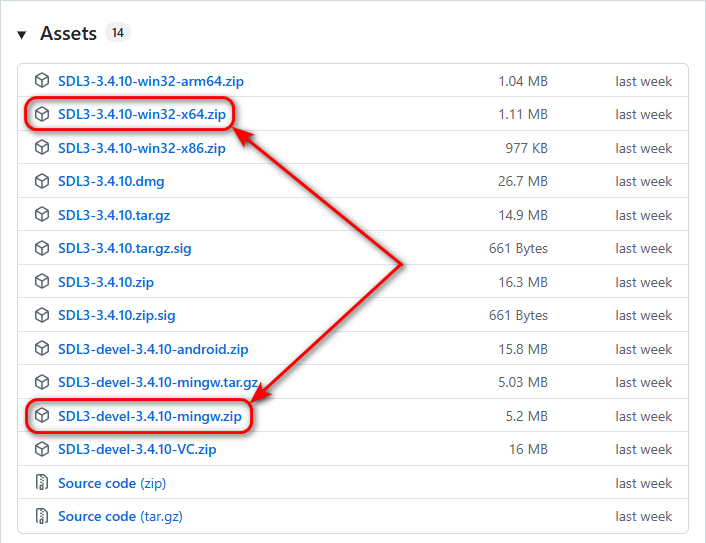
Download two archives from the official release page:
Скачайте два архива со страницы официального релиза:
-
Extract the SDL3-devel-3.4.8-mingw.zip archive to the
C:/libs/SDL3-devel-3.4.8-mingwfolder. Распакуйте архив SDL3-devel-3.4.8-mingw.zip в папкуC:/libs/SDL3-devel-3.4.8-mingw. -
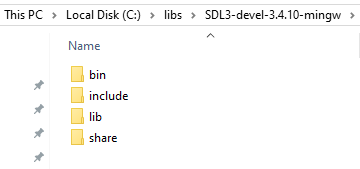
Move the headers and libraries so the structure is
SDL3-devel-3.4.8-mingw/include, etc: Переместите заголовочные файлы и библиотеки так, чтобы структура папок былаSDL3-devel-3.4.8-mingw/includeи т. д.:
-
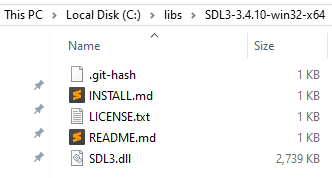
Extract the SDL3-3.4.8-win32-x64.zip archive so the path is exactly
C:/libs/SDL3-3.4.8-win32-x64: Распакуйте архив SDL3-3.4.8-win32-x64.zip так, чтобы путь был именноC:/libs/SDL3-3.4.8-win32-x64:
2. Add SDL3 to Environment Variables (Path) 2. Добавление SDL3 в переменные среды (Path)
To ensure your applications can find the SDL3.dll file at runtime, you should add the following path to the Path variable in your User variables section:
Чтобы приложения могли находить SDL3.dll файл при запуске, добавьте следующий путь в переменную Path в разделе Переменные среды пользователя:
C:\libs\SDL3-3.4.8-win32-x64
3. Project Structure 3. Структура проекта
C Project: Create an empty folder named rectangle-sdl3-c and set up the following hierarchy by creating new CMakeLists.txt and main.c files:
Проект на C: Создайте пустую папку с именем rectangle-sdl3-c и подготовьте следующую иерархию, создав файлы CMakeLists.txt и main.c:
rectangle-sdl3-c/
├── CMakeLists.txt
└── src/
    └── main.c
C++ Project: Create an empty folder named rectangle-sdl3-cpp and set up the following hierarchy by creating new CMakeLists.txt and main.cpp files:
Проект на C++: Создайте пустую папку с именем rectangle-sdl3-cpp и подготовьте следующую иерархию, создав файлы CMakeLists.txt и main.cpp:
rectangle-sdl3-cpp/
├── CMakeLists.txt
└── src/
    └── main.cpp
Follow the steps below to create the CMakeLists.txt and the source files in the src directory with the provided content.
Следуйте шагам ниже, чтобы создать файл CMakeLists.txt и исходные файлы в директории src с указанным содержимым.
4. Project Configuration (CMakeLists.txt) 4. Конфигурация проекта (CMakeLists.txt)
C Project: Copy and paste the following code into the CMakeLists.txt file:
Проект на C: Скопируйте и вставьте следующее содержимое в файл CMakeLists.txt:
CMakeLists.txt (C version)
set(CMAKE_BUILD_TYPE "Debug")
cmake_minimum_required(VERSION 3.21)
project(rectangle-sdl3-c)

set(SDL3_DIR "C:/libs/SDL3-devel-3.4.8-mingw/lib/cmake/SDL3")
find_package(SDL3 REQUIRED)

add_executable(app)

target_sources(app
PRIVATE
    src/main.c
)

target_link_libraries(app PRIVATE SDL3::SDL3)
target_link_options(app PRIVATE -mconsole)
C++ Project: Copy and paste the following code into the CMakeLists.txt file:
Проект на C++: Скопируйте и вставьте следующее содержимое в файл CMakeLists.txt:
CMakeLists.txt (C++ version)
set(CMAKE_BUILD_TYPE "Debug")
cmake_minimum_required(VERSION 3.21)
project(rectangle-sdl3-cpp)

set(SDL3_DIR "C:/libs/SDL3-devel-3.4.8-mingw/lib/cmake/SDL3")
find_package(SDL3 REQUIRED)

add_executable(app)

target_sources(app
PRIVATE
    src/main.cpp
)

target_link_libraries(app PRIVATE SDL3::SDL3)
target_link_options(app PRIVATE -mconsole)
5. Source Code 5. Исходный код
Copy and paste the following code into the src/main.c (or src/main.cpp) file:
Скопируйте и вставьте следующее содержимое в файл src/main.c (или src/main.cpp):
main.c / main.cpp
#include <SDL3/SDL.h>
#include <SDL3/SDL_main.h>

int main(int argc, char* argv[])
{
    if (!SDL_Init(SDL_INIT_VIDEO)) {
        return -1;
    }

    SDL_Window* window = SDL_CreateWindow("SDL3 C", 400, 300, 0);
    SDL_Renderer* renderer = SDL_CreateRenderer(window, NULL);

    bool running = true;
    SDL_Event event;

    while (running) {
        while (SDL_PollEvent(&event)) {
            if (event.type == SDL_EVENT_QUIT) {
                running = false;
            }
        }

        SDL_SetRenderDrawColor(renderer, 20, 20, 20, 255);
        SDL_RenderClear(renderer);

        SDL_FRect rect = { 125.0f, 125.0f, 150.0f, 50.0f };
        SDL_SetRenderDrawColor(renderer, 0, 255, 0, 255);
        SDL_RenderFillRect(renderer, &rect);

        SDL_RenderPresent(renderer);
    }

    SDL_DestroyRenderer(renderer);
    SDL_DestroyWindow(window);
    SDL_Quit();
    return 0;
}
6. Opening the Project in IDEs 6. Открытие проекта в IDE
Open the CMakeLists.txt file in CLion or Qt Creator. CMake will handle the rest. Откройте файл CMakeLists.txt в CLion или Qt Creator. CMake позаботится об остальном.
7. Automation Scripts (.bat) 7. Скрипты автоматизации (.bat)
You can open the project folder in Sublime Text 4 (or Notepad++). Create the following .bat scripts in the project root directory to automate the configuration, building, and running of your application:
Вы можете открыть папку проекта в Sublime Text 4 (или Notepad++). Создайте следующие .bat скрипты в корневой директории проекта для автоматизации конфигурации, сборки и запуска вашего приложения:
1. config-exe.bat
cmake -G "MinGW Makefiles" -S . -B dist/exe2. build-exe.bat
cd dist\exe
cmake --build .
cd ..\..
3. run-exe.bat
dist\exe\appTo build and launch the application, run these scripts in the terminal in the following order:
Чтобы собрать и запустить приложение, выполните эти скрипты в терминале в следующем порядке:
config-exe
build-exe
run-exe
What's Next?Что дальше?
In this guide, we used a traditional while loop. In the next tutorial, we will explore the SDL3 Main Callback system, which is the recommended way to write high-performance, cross-platform applications for Mobile and Web (WebAssembly).
В этом руководстве мы использовали традиционный цикл while. В следующем уроке мы изучим систему SDL3 Main Callback — рекомендуемый способ написания высокопроизводительных кроссплатформенных приложений для мобильных устройств и Web (WebAssembly).
Support My Work Поддержать проект
If these tutorials helped you, consider buying me a coffee! Если эти туториалы вам помогли, вы можете поддержать автора.
Sberbank

Direct transfer via phone number Перевод по номеру телефона
Bybit (USDT TRC20)

Support via Cryptocurrency Поддержка криптовалютой