SDL3 Desktop: Setup for C and C++ (MinGW and CMake) SDL3 для Desktop: Настройка для C и C++ (MinGW and CMake)
A guide to configuring SDL3 with CMake and MinGW on Windows for both C and C++. Руководство по настройке SDL3 с использованием CMake и MinGW на Windows для C и C++.
Obtain SDL 3.4.12 Получение SDL 3.4.12
-
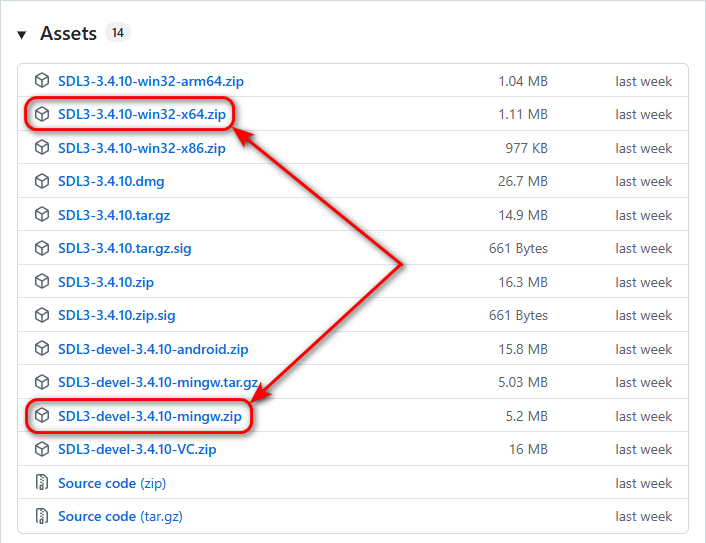
Download two archives from the official release page:
Скачайте два архива со страницы официального релиза:
-
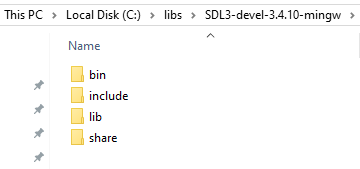
Extract the SDL3-devel-3.4.12-mingw.zip archive to the
C:/libs/SDL3-devel-3.4.12-mingwfolder. Распакуйте архив SDL3-devel-3.4.12-mingw.zip в папкуC:/libs/SDL3-devel-3.4.12-mingw. -
Move the headers and libraries so the structure is
SDL3-devel-3.4.12-mingw/include, etc: Переместите заголовочные файлы и библиотеки так, чтобы структура папок былаSDL3-devel-3.4.12-mingw/includeи т. д.:
-
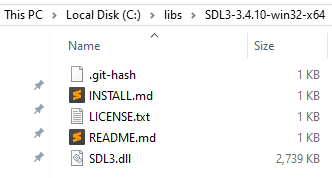
Extract the SDL3-3.4.12-win32-x64.zip archive so the path is exactly
C:/libs/SDL3-3.4.12-win32-x64: Распакуйте архив SDL3-3.4.12-win32-x64.zip так, чтобы путь был именноC:/libs/SDL3-3.4.12-win32-x64:
Add SDL3 to Environment Variables (Path) Добавление SDL3 в переменные среды (Path)
To ensure your applications can find the SDL3.dll file at runtime, you should add the following path to the Path variable in your User variables section:
Чтобы приложения могли находить SDL3.dll файл при запуске, добавьте следующий путь в переменную Path в разделе Переменные среды пользователя:
C:\libs\SDL3-3.4.12-win32-x64
Project Structure Структура проекта
C Project: Create an empty folder named rectangles-main-sdl3-mingw-c and set up the following hierarchy by creating new CMakeLists.txt and main.c files:
Проект на C: Создайте пустую папку с именем rectangles-main-sdl3-mingw-c и подготовьте следующую иерархию, создав файлы CMakeLists.txt и main.c:
rectangles-main-sdl3-mingw-c/
├── CMakeLists.txt
└── src/
    └── main.c
C++ Project: Create an empty folder named rectangles-main-sdl3-mingw-cpp and set up the following hierarchy by creating new CMakeLists.txt and main.cpp files:
Проект на C++: Создайте пустую папку с именем rectangles-main-sdl3-mingw-cpp и подготовьте следующую иерархию, создав файлы CMakeLists.txt и main.cpp:
rectangles-main-sdl3-mingw-cpp/
├── CMakeLists.txt
└── src/
    └── main.cpp
Follow the steps below to create the CMakeLists.txt and the source files in the src directory with the provided content.
Следуйте шагам ниже, чтобы создать файл CMakeLists.txt и исходные файлы в директории src с указанным содержимым.
Project Configuration (CMakeLists.txt) Конфигурация проекта (CMakeLists.txt)
C Project: Copy and paste the following code into the CMakeLists.txt file:
Проект на C: Скопируйте и вставьте следующее содержимое в файл CMakeLists.txt:
CMakeLists.txt (C version)
C++ Project: Copy and paste the following code into the CMakeLists.txt file:
Проект на C++: Скопируйте и вставьте следующее содержимое в файл CMakeLists.txt:
CMakeLists.txt (C++ version)
Source Code Исходный код
Copy and paste the following code into the src/main.c (or src/main.cpp) file:
Скопируйте и вставьте следующее содержимое в файл src/main.c (или src/main.cpp):
main.c / main.cpp
Opening the Project in IDEs Открытие проекта в IDE
Open the CMakeLists.txt file in CLion or Qt Creator. CMake will handle the rest. Откройте файл CMakeLists.txt в CLion или Qt Creator. CMake позаботится об остальном.
Automation Scripts (.bat) Скрипты автоматизации (.bat)
You can open the project folder in Sublime Text 4 (or Notepad++). Create the following .bat scripts in the project root directory to automate the configuration, building, and running of your application:
Вы можете открыть папку проекта в Sublime Text 4 (или Notepad++). Создайте следующие .bat скрипты в корневой директории проекта для автоматизации конфигурации, сборки и запуска вашего приложения:
1. config-exe.bat
cmake -G "MinGW Makefiles" -S . -B dist/exe2. build-exe.bat
cd dist\exe
cmake --build .
cd ..\..
3. run-exe.bat
dist\exe\appTo build and launch the application, run these scripts in the terminal in the following order:
Чтобы собрать и запустить приложение, выполните эти скрипты в терминале в следующем порядке:
config-exe
build-exe
run-exe
GitHub Repository GitHub Репозиторий
You can explore the source code and download the complete project directly from the GitHub repository: Вы можете изучить исходный код и скачать готовый проект напрямую из репозитория на GitHub:
Alternative: SDL3 Callback System Альтернатива: Система Callbacks в SDL3
SDL3 introduces a modern callback-based approach. Instead of a while loop, you define specific functions that SDL calls when needed. This is the preferred method for Web (Emscripten) and Mobile platforms.
В SDL3 представлен современный подход на основе обратных вызовов (callbacks). Вместо цикла while вы определяете специальные функции, которые SDL вызывает по мере необходимости. Это рекомендуемый метод для Web (Emscripten) и мобильных платформ.
| Function | Description Описание |
|---|---|
SDL_AppInit |
Called once at startup. Initialize SDL, create window, and load assets here. Вызывается один раз при запуске. Инициализация SDL, окна и загрузка ресурсов. |
SDL_AppEvent |
Called whenever a new event (keyboard, mouse, quit) occurs. Вызывается каждый раз, когда происходит событие (клавиатура, мышь, выход). |
SDL_AppIterate |
The "Heartbeat". Called every frame. Put your rendering and logic here. "Сердцебиение" программы. Вызывается каждый кадр. Здесь происходит рендеринг. |
SDL_AppQuit |
Called before exiting. Clean up and free memory here. Вызывается перед выходом. Очистка и освобождение памяти. |
main.c / main.cpp (Callback Version)
GitHub Repository GitHub Репозиторий
You can explore the source code and download the complete project directly from the GitHub repository: Вы можете изучить исходный код и скачать готовый проект напрямую из репозитория на GitHub:
Support My Work Поддержать проект
If these tutorials helped you, consider buying me a coffee! Если эти туториалы вам помогли, вы можете поддержать автора.
Sberbank (Russia only) Сбербанк (только для РФ)

Direct transfer via phone number (Russia only) Перевод по номеру телефона (только для РФ)
USDT TRC20

Support via Cryptocurrency Поддержка криптовалютой